feat: create the workspace shell
The demo starts with a small workspace and a clean main branch.
Changed files
src/App.tsxsrc/styles/workspace.css
Free and open source · MIT licensed
See the whole story of your code. Follow every branch, stage the right changes, and resolve conflicts in a workspace that feels like your own. Your Git setup comes with you.
Linux, macOS & Windows All downloads
curl -fsSL https://gitworkbench.github.io/install.sh | bashDebian, RPM, Arch & AppImage · SHA-512 verified by the installer.
h1s70ry // try the timeline
Scrub a fictional commit history. Each step grows the graph and reveals the files and message from that moment.
Explore history replay and file archaeology →The demo starts with a small workspace and a clean main branch.
src/App.tsxsrc/styles/workspace.cssA graph makes the main line of work visible at a glance.
src/graph/lanes.tssrc/graph/CommitNode.tsxThe third commit improves how branch labels fit beside the graph.
src/graph/labels.tsA feature branch adds controls for stepping through earlier commits.
src/history/Timeline.tsxsrc/history/useReplay.tsThe branch gets clearer explanations and a focused regression check.
docs/history.mdsrc/history/Timeline.test.tsxThe feature branch rejoins main with a file preview for each step.
src/history/ChangedFiles.tsxsrc/history/CommitPreview.tsxThe timeline now has a clear keyboard path through the same history.
src/history/Timeline.tsxA final small change rounds out the example branch history.
src/history/EmptyState.tsxdocs/history.mdUse the slider, arrow keys, or Play to explore the sample history.
Sample commits, authors, and files are fictional. This interactive demo does not connect to a repository or change files.
a1f3c2d // features
Read branch history, review a patch, resolve a conflict, and recover a change. Explore the tools behind each part of your day.
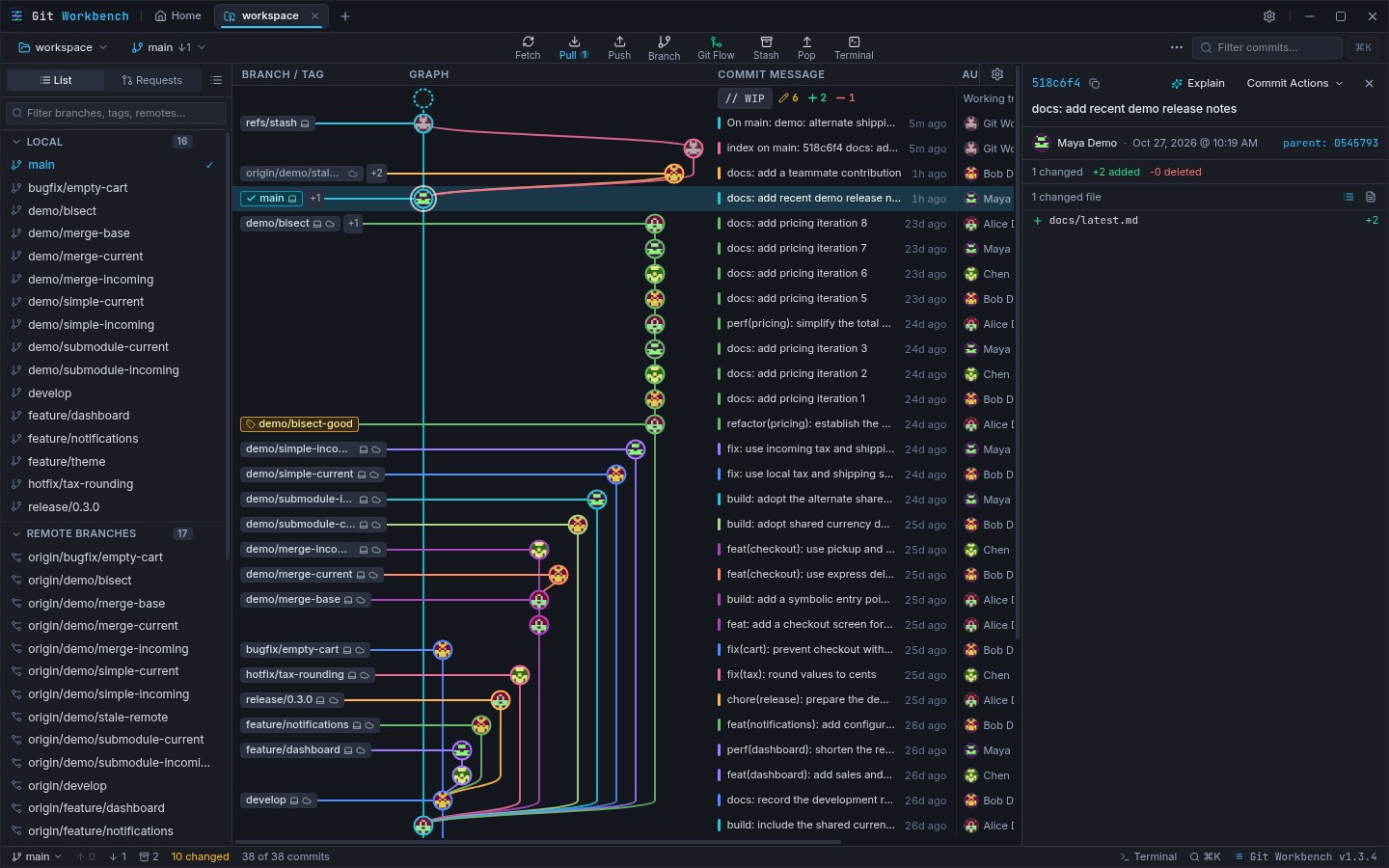
Every branch travels its own color lane, curves drawn by hand in the graph. Select a node to open its files, parent hashes, and patch. HEAD, local and remote branches, and tags sit inline beside each summary.
Cubic Bézier lanes · Parent links · Adjustable row density
Replay a local or remote branch one commit at a time as the graph grows. Inspect each step’s changed files and diff, then scrub a file’s history to see who changed each line and what the commit said.
Read-only replay · Historical blame · Per-commit file diffs
See a brief, subtle confirmation after a rebase completes or the last conflict is resolved. Turn milestone animations off in Appearance settings, or let your reduced-motion preference keep the interface still.
Optional · Reduced-motion aware · Easy to disable
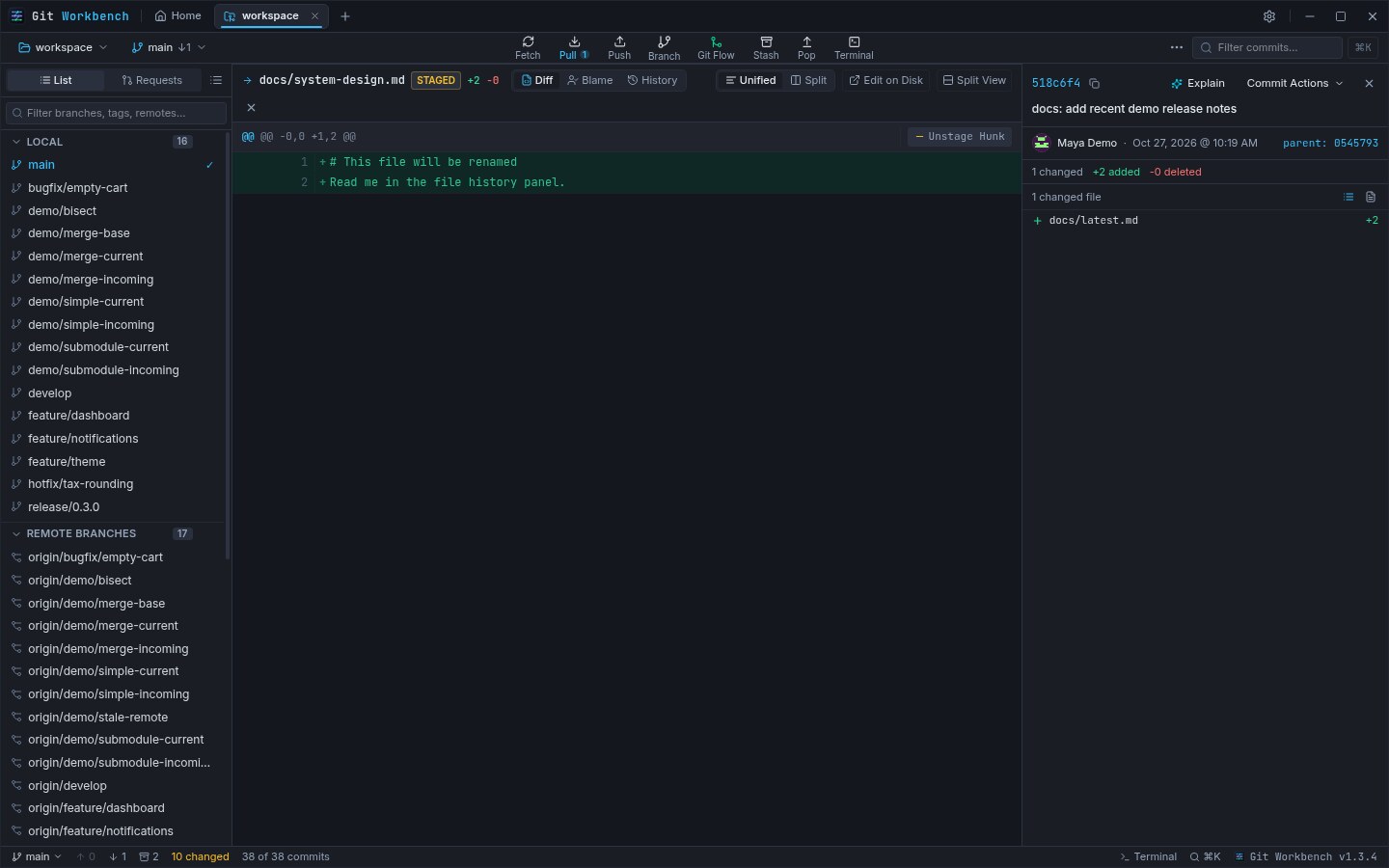
Read unified or side-by-side diffs with syntax highlighting, then stage, unstage, or discard individual hunks. Flat path lists and expandable folder trees both mark added, modified, deleted, and renamed files.
A/M/D/R badges · Line counts · Zip through the tree
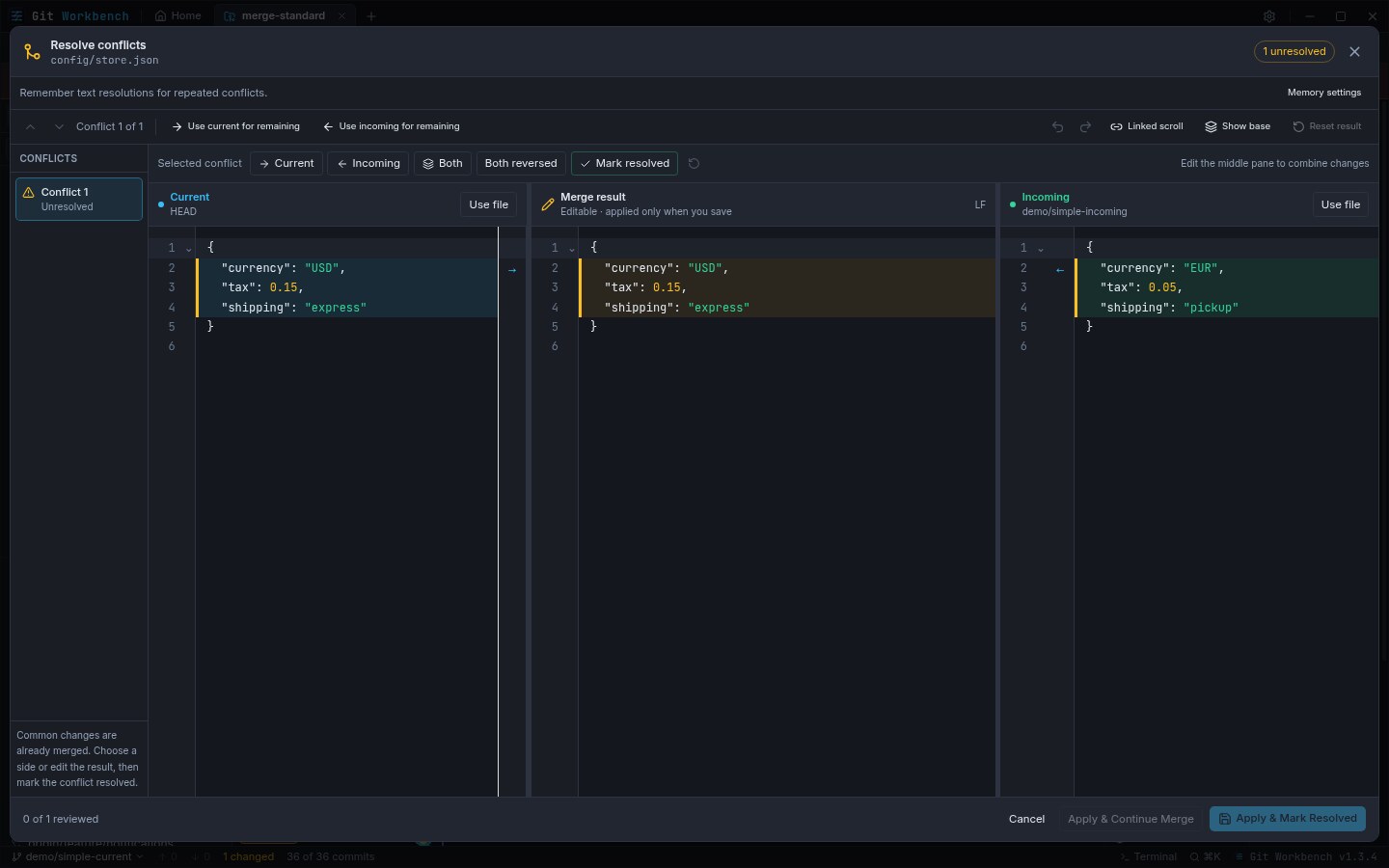
Current and Incoming flank an editable result, with the read-only common ancestor on demand. Repeated conflicts offer remembered resolutions backed by git rerere – preview first, apply explicitly.
Gutter arrows · keep both · Alt+↑/↓ between blocks
Browse open requests for any remote, read conversations and CI checks, post line comments, and approve or request changes. Create a request straight from the checked-out branch.
Conversations · CI checks · Approvals
Sign in to GitHub, GitLab.com, self-hosted GitLab with nested groups and HTTPS ports, Bitbucket Cloud, or Gitea — the request and review features work over each one the same way.
GitHub · GitLab · Bitbucket Cloud · Gitea
Built-in palettes from the onyx Git Workbench Dark to Clean Studio Light, repainted live as you choose — with per-area typography and text-size presets and graph-density controls.
git-workbench-dark default · Individual resets
Ctrl+` opens xterm.js over a native pseudoterminal: full login shell, tab completion, ANSI color. Each repository keeps its own session and recent output, even while the drawer stays closed.
Per-repo sessions · Resize or maximize · Restart on demand
Restore points snapshot HEAD, the staged and unstaged split, and untracked files before resets, discards, and rewrites. Browse the reflog and branch off any entry to pull lost work back.
Private refs · Safety branches · Range-diff comparison
Recompose a commit message or explain a whole branch from its base. Choose any provider — including a local Ollama model — and nothing is ever pushed: drafts apply to local commits behind a restore point.
Explicit apply · Encrypted keys · Local-first
Workbench shells out to the git binary you already installed and reads your .git folder directly. No proprietary database, no second login, no surprise rewrite of your settings.
Async, non-blocking · Your config, untouched
An interactive guide on board walks from first-run setup through rebases, worktrees, rerere memory, and sparse checkout — read the topic and apply it in the same window.
First-run setup · Advanced workflows · In-app
Split commits by file or hunk with a preview, retarget stacked branches with isolated restack previews, manage Git LFS rules and transfers, and pick sparse-checkout folders you can save as layouts.
Git 2.37–2.38+ features · Clearly listed limits
Explore the feature guides →Compare Git clients →New here? Start with the setup guide →
d92b6e4 // worktrees
Captured straight from the app, not staged mockups. Scroll the strip, click a frame to open it at full size.
Captured with fictional demo repositories and identities — no customer repositories or credentials are shown.
c3d8a15 // appearance
The palettes the app actually ships with. Tap a swatch — the workspace mock repaints itself, exactly the way the app does.
Every theme, font preset, and text size lives in Settings → Typography & Density, with individual resets — see thetypography guide.
f18a2b9 // reflog
The safe path is built in: choices are reversible, destructive actions snapshot first, and rewrites stay local until you push.
Pick a commit profile, preview your theme, and configure AI only if you want it. Skipping the setup changes nothing — every choice lives in Settings and can be redone later.
Open an existing project or create one from the Home dashboard, pin it, and switch tabs between projects. Workbench reads .git through the system git, not a hidden index of its own.
Follow the lanes to the commit you need, inspect its files, stage lines, hunks, or whole files, and write the commit message with or without an AI draft.
Fetch, pull, and push through your existing SSH keys or credential helper. Review requests with checks and approvals, and lean on restore points before any history rewrite — rewrites stay local until you push.
4c2d5e8 // keyboard-first
Shortcuts shown for macOS use ⌘ where the sheet listsCtrl.
7e9f1a3 // checkout
One workbench, every desktop. Pick your platform and get straight to work. Free to use, with your existing Git setup.
AppImage for any distribution, or a package for your system.
Unsigned builds — install and update manually from the release page.
Supports in-app software updates.
Detects your distribution and verifies SHA-512 checksums before installing.
curl -fsSL https://gitworkbench.github.io/install.sh | bashe05f73c // good to know
The essentials on getting started, your existing setup, and keeping your code yours.
Yes. Git Workbench is open source under the MIT license: free for personal and commercial use. The source lives on GitHub, where you can file issues and contribute.
No. Local Git work needs no account at all. Provider sign-in is only needed for pull and merge request features, and AI assistance is configured separately if you want it.
Git Workbench shells out to your installed system git and reads the repository directly. Your hooks, SSH keys, GPG signing, credential helper, and .gitconfig all keep working as they do on the command line.
GitHub, GitLab.com, self-hosted GitLab (including nested groups and HTTPS ports), Bitbucket Cloud, and Gitea are supported for request and review workflows. GitHub Enterprise and Bitbucket Data Center are not supported yet.
The basics work with any recent git. Optional tools have floors: stacked-branch restacks need Git 2.38+, sparse-checkout editing needs 2.37+, and range-diff comparisons need 2.19+. The tools tell you when a prerequisite is missing.
It detects Debian-based, RPM-based, and Arch-based distributions, downloads the matching package from the public GitHub release, verifies its SHA-512 checksum, and hands off to your package manager, which keeps its usual confirmation prompt. Other distributions get a per-user AppImage with a desktop entry. Current Linux builds are x86_64.
The Windows installer and the Linux AppImage, deb, rpm, and Pacman builds can download and install updates from About → Software updates; package formats may ask for system authorization. Unsigned macOS builds are always updated manually from the release page.
AI help is optional and configured per provider you choose — including a local Ollama instance, which keeps prompts on your machine. Requested prompts or selected code are sent only to that provider. Keys are stored encrypted outside renderer preferences and are never attached to commits.
08b4c62 // merge --into open-source
The whole app — React renderer, Electron main process, packaging pipeline, and this website — is MIT licensed. Explore the source, report an issue, or help make a workflow better. The application tests its Git operations in temporary repositories.
npm run demo:create).